
This technical writing sample is oriented towards prosumer camera users, with the goal of making the technical information approachable through narrative.
The Sony XDCam PXW-Z200
Sony Tries to Eliminate All Real-World Shooting Challenges. Again.
By Phillip E. Honstein
Emagineer.pro
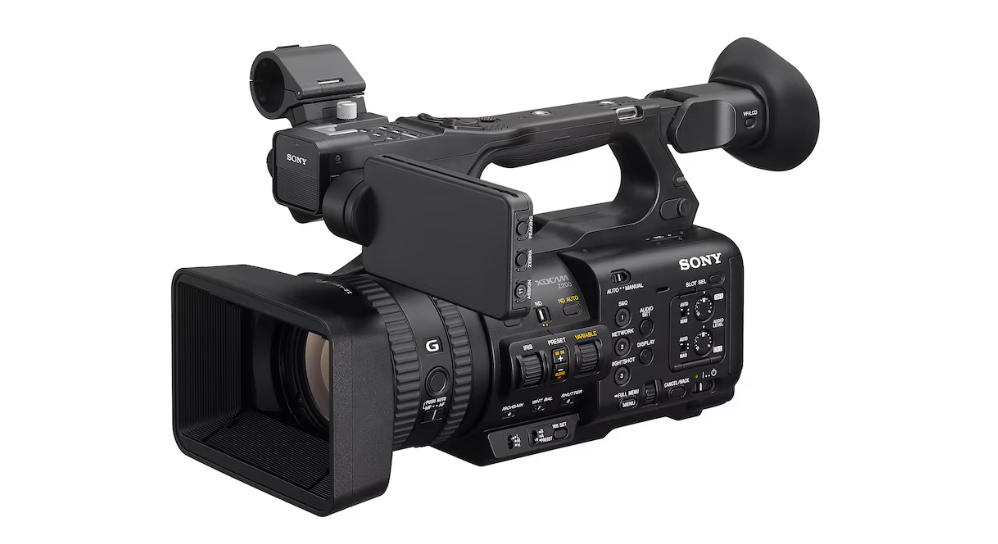
With the Sony XDCam PXW-Z200, you won’t have to worry about focus, keeping your subject in-frame, dialing-in exposure, or having an audio assistant, if you don’t want to. It can just be you, the camera, your subject, and a streaming connection if you’re live broadcasting. And the results can be amazing.
This is the thanks you get. You’ve been taking pictures and shooting video of family and friends for fun, but now you have an assignment: you’re the official camera person for your kids’ performance, the CEO speaking at the company-wide event, or that most perilous of assignments, your spouse speaking on-stage.
Someone hands you the Sony XDCam PXW-Z200 and says, “You can download the manual.” Actually, this is your lucky day.
The Specs
The manual tells the technical specs, but it doesn’t tell the story:
The Sony PXW-Z200 has a 1”-type, 14-megapixel Exmore RS sensor and a BIONZ XR image processor. In 35mm terms, it goes from a wide 24mm to a 480mm telephoto, at an aperture range of F2.8 to F4.5 at full zoom. It can shoot 4k video at 60p with full audio, and without audio 120p in 4K or 240p in Full HD. It has AI processing, a digital ND filter, and color gamut presets. It has a multi-interface shoe and a 12G-SDI connection. That’s a lot.
The Image You Deserve
The Exmore RS sensor is your digital film. It will record your kids, your CEO, or your spouse on stage by capturing 14 million individual points of light, even though 4k video only requires 8.3 million pixels. This provides extra capacity for digital zooming and cropping, without losing resolution.
The BIONZ XR image processor, on the other hand, is your digital darkroom. It takes the full 5K of sensor data and condenses it down to 4K, leaving nothing out (there is No Crop, it has Full Pixel Readout, there is No Pixel binning). For you, this means fine detail and clear motion at frame rates up to 60p.
The 60 is the number of frames per second (FPS), the p is for progressive, in which each frame is an entire image. For even lesser cameras at lower resolution, 60p is what you can use to pan smoothly across a scene without the jitter you would see at 24 or 30 FPS. Here, it’s available at 4K.
You can also slow things down if you’re willing to record without audio. When you’re filming the kids’ soccer match, you can shoot 120p in 4K or 240p in Full HD (1920 × 1080 pixels).
The wide 24mm to 480mm telephoto mentioned in the manual translates to a 20x Optical Zoom. This gives you the ability to close the gap between you and the kids on the soccer field, or between you and the CEO on stage.
Keep it Steady
Unfortunately, your CEO paces when speaking. And Zoom lenses have always come with at least one caveat: the longer the reach, the harder it is to keep a moving subject framed without introducing vibration.
This is where Sony’s AI Processing Unit takes over, and it goes beyond the optical and digital image stabilization we’ve come to expect. Sony added Auto Framing, Auto Focus with 81% sensor coverage, and the ability to recognize and track the “human form.”
The camera isn’t simply looking for a face. Auto Focus and Auto Framing will follow a person by shape, as someone moving through space, tracking and reframing them within an HD sub-section of the larger 4K image. Position the camera with a full view of the area your CEO might wander into, and you won’t need to touch, let alone move, the camera to keep them in frame.
Free to Roam
Now that the camera is handling tracking, you’re suddenly free to do other things. Launch the Monitor & Control app on your smartphone or tablet and go ahead and manage the room: check the venue, the gear, the people, while you’re filming.
Color Presets
That’s when you realize that someone else is filming, too. And they have the next generation of the same camera, the Z300. Granted, you should have been told this before, but now that you realize that you’re in a multi-camera setup, you can coordinate with the other camera operator on matching color gamuts.
The XDCam PXW-Z200 lets you dial in a preset color gamut, such as S-Cinetone or ITU709, so your footage matches whatever else is rolling alongside it.
The goal is for skin tones and background colors to look identical between clips, between cameras. With a single global adjustment, the film editor can color grade the whole project. But if the color gamut used in individual clips don’t match, the editor must color grade all the clips individually.
Exposure Smarts
You did so well, you’re asked to shoot footage in the banquet hall.
This is where you lean on the auto Neutral Density filter to adjust exposure, saving you the fumbling with aperture settings as you move from interior lighting into daylight, or when you pass a window. It makes long, single-shot camera moves practical, even through major lighting changes.
Dialing-in the Audio Story
You also have four channels of audio in-camera, making professional audio part of the package.
You have two XLR inputs on the side of the camera, and you can add two more by plugging in a SONY MI Shoe Audio Adapter into the Multi Interface Shoe. There are two physical level dials that can be assigned to individual channels or even grouped (assign one dial to the internal inputs, the other to the audio adapter inputs). This keeps you out of menus, and the grouping keeps the levels of similarly placed mics in sync.
Out-of-the-Box Streaming
Don’t be surprised if you’re asked about live streaming or broadcasting an event, because the Sony XDCam PXW-Z200 is made for that.
Your Internet connection can be wireless via Wi-Fi, or hard-wired via Ethernet or the built-in 12G-SDI connection, a standout feature that supports longer cable runs. Having these connections built-in means one less box to carry, cable to forget, or point of failure to troubleshoot.
Our Take
The Sony XDCam PXW-Z200 is a professional camcorder that tries to give professional abilities to anyone, even the reluctant camera operator filming their kids, the CEO, or their spouse.
When someone tells you how great your footage is, just thank them and say that the event made it easy. Don’t tell them about the powerful zoom, AI autofocus, automatically adjusting exposure, professional audio connections that eliminate the need for Double System Audio, live streaming that’s “just built in,” or color gamut matching that prevents color grading nightmares.
Don’t tell them that Sony’s engineers have eliminated most of the real-world challenges of capturing great footage.
Let that be our secret.